Frequently Asked Questions
Find answers to common questions about our service
Why PetrolPrices.co.uk?
- ✓ Powered by the UK Government Fuel Finder API — updated approximately every 15 minutes
- ✓ New! Worth the drive? — every station card tells you whether a cheaper station is worth the extra miles, plus a weekly price trend arrow
- ✓ New! Price History (30 days) — see how every station's price has moved over the past month, on every station card
- ✓ New! Edit vehicle settings on every station card — set your tank size and MPG so fill costs and running costs match your car
- ✓ "Usually cheap here" badges — spot stations that are regularly among the cheapest nearby
- ✓ See what makes up each price — fuel, duty and VAT shown for every station
- ✓ Journey Planner — find the cheapest fuel stops along your route, with a "worth the detour" check on each station
- ✓ Free multi-stop routes — add up to 8 stops on any journey (other sites charge for this!)
- ✓ New! Skip the Motorway Services — see the pricey services on your route and the cheaper station just off it, with the saving after the extra miles
- ✓ Best Stop Within Range — find the cheapest station you can reach on the fuel left in your tank
- ✓ Free mileage log — save business journeys and export them for your records
- ✓ Save your favourite stations for quick price checks — all on one page, with automatic price change alerts
- ✓ Push notifications — get instant alerts on your device when favourite stations change price
- ✓ Remembers your last search and fuel settings on your device
- ✓ Sort by Price Freshness — see stations with the most recently confirmed prices first
- ✓ Savings tracker — see how much you could save across all your searches this year
- ✓ Multi-brand filtering for fast comparisons
- ✓ Store all your loyalty cards on your device and see your loyalty savings for every station
- ✓ Fuel card compatibility — see which business fuel cards (Allstar, UK Fuels, BP Plus, fuelGenie and more) are accepted at each station, with filtering
- ✓ Optional car reminders (MOT, Tax, Insurance, Service) stored on your device — no sign-up, no data sent to us
- ✓ Dark mode for comfortable viewing at night
- ✓ Adjustable font size for easier reading
- ✓ Option to show prices per gallon instead of per litre
- ✓ Works smoothly on mobile, tablet and desktop devices
- ✓ Choose your preferred map app — Google Maps, Apple Maps or Auto
- ✓ Free to use — no sign-up required
New! Journey Planner
- Visit our Journey Planner page.
- Enter your journey details (Start Location & Destination).
- (Optional) Enter your car's MPG and Tank Size — this lets us calculate your exact savings.
- Click Plan Journey to see a map of your route with all the best fuel stops highlighted.
This history is stored securely on your device using your browser's local storage and is never uploaded to our servers.
- Adjust the miles if you drove a different distance
- Tick Return trip to double the miles
- Mark it as a business or personal trip
- Choose which of your saved vehicles you used
- Add a reason for the trip, such as a client meeting
Your Mileage Log appears below Recent Journeys and works out your mileage allowance at HMRC approved mileage rates: 55p a mile for the first 10,000 business miles in the tax year, then 25p a mile (45p and 25p for trips before 6 April 2026). Trips are grouped by tax year, which runs from 6 April to 5 April, and you can export each tax year as a CSV file to open in Excel or send to your accountant.
This is the mileage allowance at HMRC approved rates, not an amount HMRC pays you. How it's used depends on whether you're self-employed or an employee, and it doesn't apply to company cars.
Miles are based on the planned route, so check them against your actual journeys before making a claim. Like your recent journeys, the log is stored on your device and is never uploaded to our servers, so export it regularly to keep a copy.
- You clear your browser data or cookies
- You switch between using Safari and the home screen app (they have separate storage)
- Your device runs low on storage
- You haven't visited the site for 7+ days (Safari may auto-clear data)
For the most reliable experience on iPhone, we recommend always using the same method to access the site — either always via the home screen icon, or always via Safari.
- Change the journey distance
- Select a car model to auto-fill MPG, or enter your own
- Adjust the fuel price per litre
The calculator updates live as you type, so you can quickly see how different assumptions affect your fuel cost. It's pre-filled with your journey data, so you can tweak values without starting from scratch.
- Pick Car, Motorbike or Van for quick defaults
- Use the − and + buttons to fine-tune your Efficiency (MPG) and Tank Size (litres)
The station cards update straight away, so the fill cost and running cost match your own vehicle. Your settings are saved on your device — no sign-up needed.
- 1-2 miles: Keeps you close to your path for a quick stop.
- 3-5 miles: Searches a wider area, which might uncover significantly cheaper supermarket fuel slightly off the main road.
- Tyres — ensure they have good tread and correct pressure.
- Brakes — to maintain safe stopping distances in wet or icy conditions.
- Heater and demisters — so you can keep your windscreen clear.
- Windscreen wipers and washer fluid — for better visibility in rain, snow, or slush.
We've also added a Tank Range feature — set your current fuel level (Empty, ¼, ½, ¾ or Full) in the Vehicle Details section, and we'll automatically calculate your driving range and highlight the cheapest station you can actually reach. Stations beyond your range are dimmed so you can focus on what's reachable.
Open the Vehicle Details section and set your:
- Fuel Economy (MPG) — your car's miles per gallon
- Tank Size — your fuel tank capacity in litres
- Current Fuel Level — tap Empty, ¼, ½, ¾ or Full
We'll then calculate your estimated driving range and show you:
- A "Best Stop Within Your Range" recommendation — the cheapest reachable station
- Green "In range" and red "Beyond range" labels on every station card
- Dimmed styling on stations you can't reach, so reachable options stand out
- A warning if your fuel won't cover the full journey distance
On multi-stop journeys, your range is measured from the start of the whole journey, through every stop — so a station after your second or third stop is only shown as 'In range' if you can genuinely reach it.
Everything updates instantly when you change your fuel level, MPG, or tank size — no need to re-search.
Our Tank Range tool is calibrated for safety. While most cars have a small reserve, we calculate 'Empty' as exactly that — to ensure you never get stranded looking for a bargain. Your safety is worth more than a few pence per litre.
- The services you'll pass, their price and how far along your route they are
- A cheaper station just off your route, how far off the route it is, and whether it comes before or after the services
- How much you'll save on a full tank, after the extra miles off your route and back
The box only appears on routes that pass motorway services.
Yes! You can add up to 8 extra stops along your journey — completely free. Just click the "Add a Stop" button below the Destination field and enter a town, city or postcode for each stop.
This is perfect for trips where you need to pick someone up, make a detour, or visit multiple places on the way. Each leg of your route is colour-coded on the map, with a different colour for each leg, so it's easy to see which part of the journey you're looking at.
On the map, each leg is drawn in a different colour with numbered markers at your stops, making it easy to follow the route at a glance.
There are three options:
- All — show every station along the route, regardless of how old its reported price is.
- Last 3 days (default) — hide stations whose price hasn't been reported in the last 3 days. A sensible balance between freshness and coverage on rural routes.
- Last 24 hrs — strict mode. Only show stations whose price was reported in the last 24 hours. Best when you want maximum confidence the price you see is the price at the pump.
When stations are hidden, a small note appears below the filter showing the count, with a Show all link to reveal them again. Your choice is remembered on this device, so the filter stays set the way you like it across journeys.
The filter also feeds into the Estimated Savings figure, the Best Value Stop card and the Best Stop Within Your Range recommendation — all three are recalculated from only the visible stations, so you'll never be recommended a stop based on a price that's weeks out of date.
Last 3 days keeps roughly twice as many stations visible compared to the strict 24-hour setting, while still cutting out the genuinely stale prices that previously distorted the cheapest-stop ranking. If you prefer a tighter cut-off, just tap Last 24 hrs — and your choice will be remembered next time.
Favourite Stations
You can also remove a station from favourites by tapping the gold star again.
- A banner at the top telling you how many stations went up or down in price
- A small badge on each affected station card so you can instantly spot which ones changed:
Price went down
Mixed price changes (some fuels up, others down)

Price went up
Because stations sell multiple fuel types, one fuel may rise while another falls — in that case, you'll see the Prices changed badge. This means it's worth checking the individual fuel prices to see exactly what's changed.
If nothing has changed since your last visit, you won't see anything — the feature only appears when there's something worth knowing.
- From the search results: tap the gold star on any favourited station to remove it
- From the favourites page: tap the gold star icon on the station card you want to remove
You can also use the "Clear All Favourites" button at the bottom of the favourites page to remove all saved stations at once.
- The ⭐ star on a map marker highlights the cheapest station in your current search results on both the map and journey pages. This is added automatically — you don't need to do anything.
- The ☆ star on a station card is the Favourites button. Tap it to save that station for quick access later.
In short: the map star means cheapest, the card star means saved by you.
- Green — among the cheapest third of stations
- Amber — around the middle
- Red — among the dearest third
Stations on the same price always share the same colour, and the big price on each station card in the list uses the same colour as its map card. The small point under each card shows exactly where the forecourt is.
Closed stations sit underneath open ones on the map. Stations open 24 hours, or with no opening hours listed, always show as normal. On the Journey Planner, if the Best Value Stop is closed at the time you search, it shows "Closed now — opens at" with its opening time.
New! Push Notifications
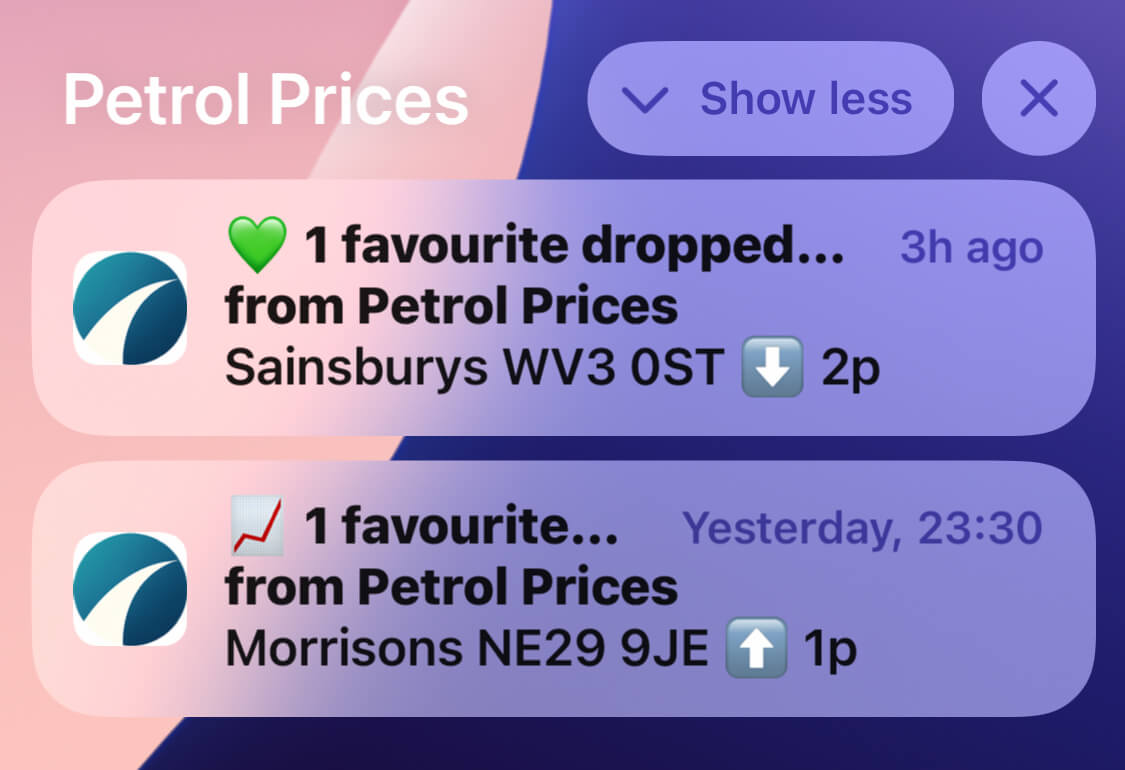
Example of how your favourite station alerts can appear on your phone
- Price drops — when a favourite station drops in price (enabled by default)
- Price increases — when a favourite station goes up in price
- Area price changes — when local average prices shift (enabled by default)
- Weekly summary — a Sunday recap of your favourites (enabled by default)
You can toggle each type on or off at any time from the settings gear icon on the Favourites page.
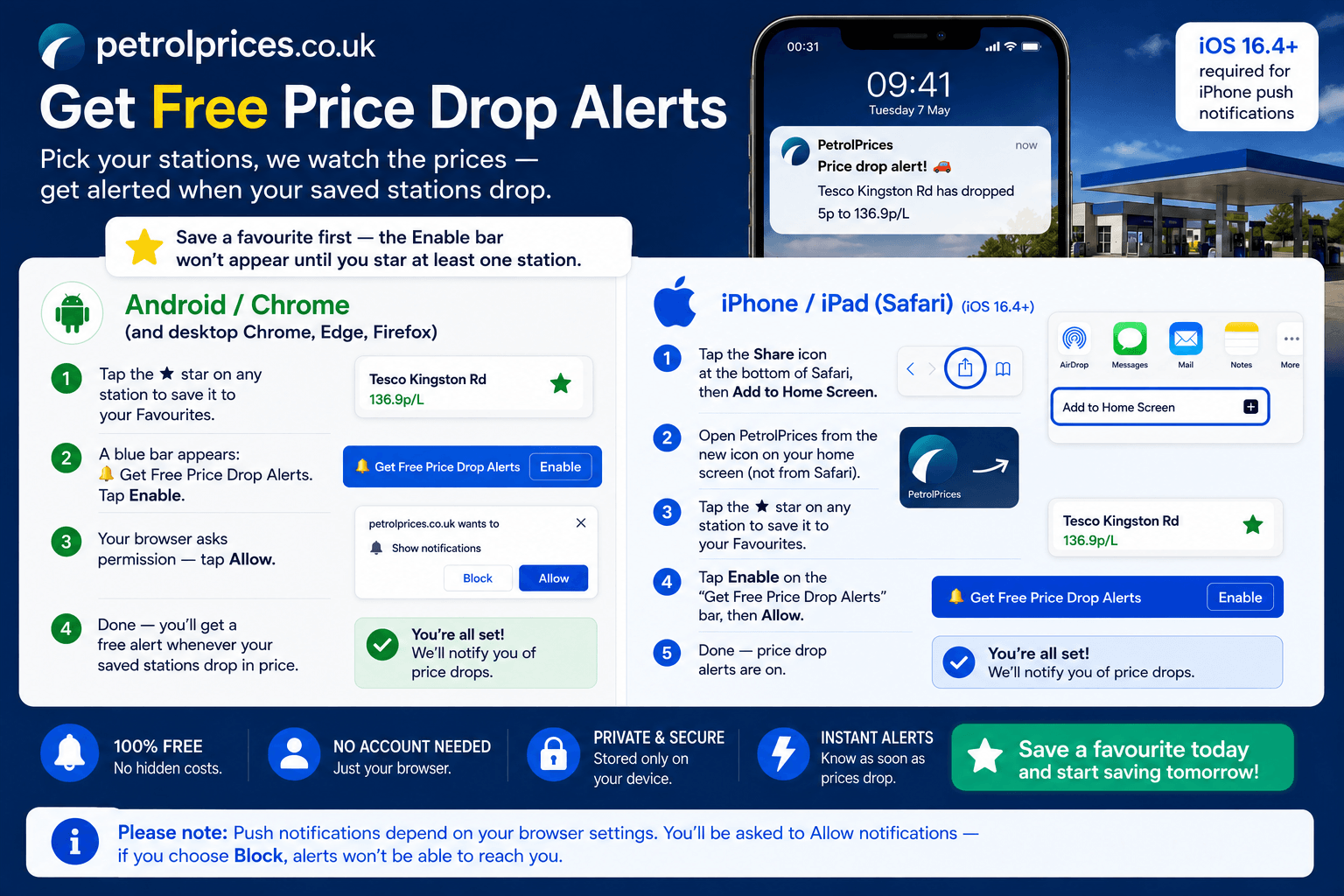
Tap or click the image to enlarge the step-by-step guide
- When you visit the Favourites page and have saved stations, you'll see a blue prompt banner inviting you to enable notifications. Simply tap "Enable".
- Alternatively, tap the gear icon (⚙️) to open Settings, scroll to the Notifications section, and tap "Enable Notifications".
Your browser will then ask you to allow notifications from PetrolPrices.co.uk — tap Allow to confirm.
- Android — Chrome, Firefox, Edge, Samsung Internet
- Windows / Mac / Linux — Chrome, Firefox, Edge
- iPhone / iPad — Safari (iOS 16.4 or later, and you need to add PetrolPrices to your Home Screen first)
If you don't see the notification prompt, your browser may not support push notifications or you may have previously blocked them (see below).
- Chrome — tap the padlock icon (🔒) in the address bar → Site settings → Notifications → Allow
- Firefox — tap the padlock icon → Connection secure → More information → Permissions → Notifications → Allow
- Safari (Mac) — Safari menu → Settings → Websites → Notifications → find PetrolPrices → Allow
After changing the permission, return to the Favourites page and tap "Enable Notifications" again.
- Make sure you've tapped "Enable" and allowed notifications in your browser
- Check that your device's notification settings allow alerts from your browser (especially on Android and iOS)
- Notifications are only sent when prices actually change — if your favourite stations haven't updated yet, there's nothing to report
- On iPhone, push notifications require iOS 16.4+ and PetrolPrices must be added to your Home Screen
Loyalty Cards
- Create a dedicated photo album on your device (e.g., name it "Loyalty Card Backups")
- Each time you add a card to the site, save a copy of the barcode image to that album
This way, if you ever clear your browser data or switch to a new phone, you'll have all the images ready to be re-added in seconds.
Business Fuel Cards
Your choice is remembered on this device and shared across the Fuel Price List, Fuel Price Map and Journey Planner, so you only need to set it once. On the Journey Planner, picking a vehicle also auto-fills the MPG and Tank Size fields in Vehicle Details — you can then fine-tune them to match your specific car if you want more accurate journey cost estimates.
This is the quick option. If you've saved a specific car under "Show prices for your car" (also in the Filter panel), that car's exact fuel type, tank size and mpg are used instead — so you don't need to set both.
- Allstar — the UK's largest network, accepted at 90%+ of stations
- UK Fuels / KeyFuels — popular with fleets, vans and trades
- BP Plus — accepted at BP, Esso, Texaco and participating Gulf sites
- Shell Card — Shell stations
- Esso Card — Esso stations
- fuelGenie — Tesco, Morrisons and Sainsbury's
- fuelGenie+ — all fuelGenie sites plus most Shell stations
- Texaco Fastfuel — Texaco stations
Data & Accuracy
🟢 Fresh price — reported within the last 24 hours. This price is very likely to be accurate.
🟡 Aging price — reported 1 to 3 days ago. The price is likely still correct but may have changed.
🔴 Stale price — reported more than 3 days ago. Treat this price with caution as it may no longer be accurate.
The badge also shows the exact date the price was last reported and how long ago that was, so you can make an informed decision before driving to a station.
It's particularly useful when you want to be confident the price you see is still accurate at the pump — stations that reported their price an hour ago are far more reliable than ones that haven't updated in days.
For example, if the cheapest station in your area is 143.9p and the average is 156.2p, filling a 55-litre tank at the cheapest station would save you around £6.77. Over dozens of searches, these savings add up — the tracker shows you the running total for the year.
The tracker is stored on your device and can be reset at any time using the Reset link. No data is sent to our servers.
New! Worth the Drive, Weekly Trend & Price Spread
- ✓ Worth the drive — you save £1 or more on a fill, even after the extra miles.
- Barely worth it — you save something, but less than £1, so it's not worth going out of your way.
- ✗ Not worth the drive — the extra miles cost more than you'd save.
- Cheaper than [station], and nearer — this station is both cheaper and closer, so it's an easy choice.
- [Station] is cheaper and nearer — you'd be better off at the other station.
We always show the figures, so you can see exactly how much is at stake and decide for yourself.
- Work out how much you'd save on a full fill, using your tank size.
- Work out the extra miles there and back compared with the nearer station.
- Work out what those extra miles cost in fuel, using your car's MPG.
- Take the fuel cost of the extra miles away from the saving at the pump.
You can change your tank size and MPG at any time using the Edit vehicle settings link on any station card. Distances are measured from your search location in a straight line, so real road miles may be slightly longer — treat the result as a quick guide.
For the same reason, we never compare against a station with a stale price. The station we compare with always has a fresh or recent price, so the verdict isn't based on an out-of-date figure.
- ↑ 3.0p vs 8 days ago — the price has gone up.
- ↓ 2.0p vs 8 days ago — the price has come down.
- → No change vs 8 days ago — the price is the same.
It matches the fuel type you're viewing. If a station doesn't have enough recent history yet, the line is left blank. For the full picture, open the Price History (30 days) chart at the bottom of the card.
This means a station in Birmingham is only compared with other stations near Birmingham — not with one 100 miles up the road. If there's no up-to-date station nearby to compare with, no verdict is shown. The route box also shows how much prices vary along your whole route.
- Home page — on every station in your search results
- Map view — on the station list and inside the map pop-ups
- Journey Planner — on every station along your route
Like everything on PetrolPrices.co.uk, they're completely free — no sign-up needed.
New! Price History (30 Days)
This helps answer questions like:
- "Is today's price a genuine bargain, or is this station always cheap?"
- "Has this forecourt been creeping up over the last few weeks?"
- "Should I fill up today, or wait a couple of days?"
You decide — we just show you the data.
It's live on all four of our main pages:
- Home page (index.php) — on every station in your search results
- Map view (map.php) — inside the station card
- Journey Planner (journey.php) — on every stop along your route
- Favourites (favourites.php) — on your saved stations
- The station only recently started appearing in the UK Government Fuel Finder feed, so we have fewer than ~5 days of history for it yet
- The station has gaps in its reporting (it doesn't report a price every day), which can happen with smaller independents
As we build up more data day by day, this message will disappear from those stations. The vast majority of UK forecourts have a full 30-day chart available right now.
Station Amenities
- 24hr — the station is open 24 hours a day
- Car Wash — a car wash is available on site
- Toilets — public toilets are available
- AdBlue — AdBlue is available at the pump for diesel vehicles with SCR systems
We plan to add more amenity types in the future as data becomes available.
- Search results (index.php) — the main fuel price listings
- Map view (map.php) — when you tap a station marker or view the station panel
- Journey Planner (journey.php) — on station cards along your route
- Favourites (favourites.php) — on your saved station cards
The badges are colour-coded and easy to spot — look for them just below the station name or near the opening hours.
A small green number on the Filter button tells you how many filters you have active, so it's easy to see at a glance. Amenity filtering works on the Fuel Price List, Fuel Price Map and Journey Planner pages, and your choices are remembered on this device for next time.
The AdBlue badge makes it easy to spot stations where you can fill up at the pump, rather than buying smaller bottles from a shop.
Privacy & Security
Nothing is sent to our servers, and we do not collect, access, or process this information in any way.
Because reminders are kept locally on your device, they will not sync across phones or computers. You can edit or delete them at any time directly from your browser settings.
Your preferences are safely stored in your browser's local storage (not cookies), meaning they stay on your device and aren't shared with anyone.
If you'd like to start fresh, click the "Clear location cache" button on the search page — this will instantly remove your saved preferences.
Why Are Car Reminders Useful?
Add your dates:
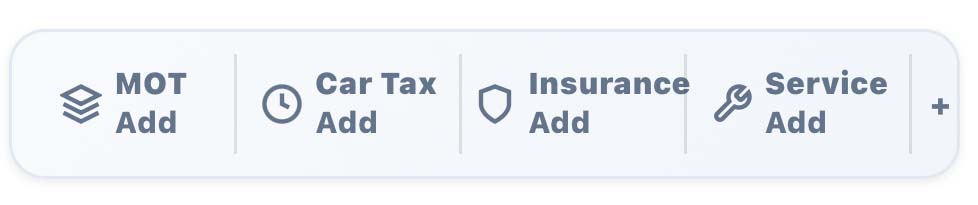
Tap any section and you'll see all your cars as colour-coded buttons. Tap a car to set or update its date, use + Add car to save another, or open Vehicle details & fuel specs to give a car a name, registration, tank size, mpg and fuel type.
The bar always shows the soonest-due date across all your cars for each category — so an urgent reminder on one car is never hidden behind another car that isn't due yet:
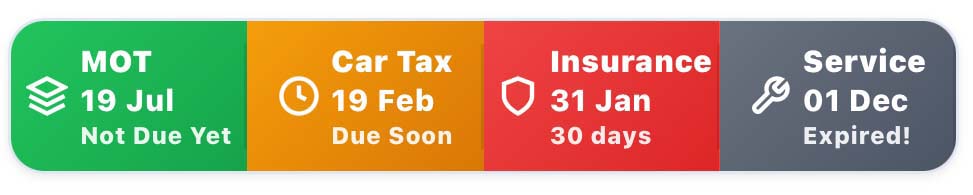
- Green — not due yet (more than 60 days away)
- Amber — due soon (within 60 days)
- Red — due very soon or due today (within 30 days)
- Grey — expired, take action immediately
Everything you enter — your dates, car names and details — is stored only on your device. We never see or store your reminder data.
Privacy note: All reminder dates are saved only on your device (local storage). We don't receive, store, or track your reminder data.
- ✓ Set the fuel type to match your car automatically — Unleaded, Super, Diesel or Premium Diesel
- ✓ Show the cost to fill your tank, based on the tank size you saved
- ✓ Estimate your running cost — roughly what that station's fuel works out at per 100 miles — from the MPG you saved
The running-cost line appears on each station's prices (and in the map pop-ups) whenever a car with an MPG figure is selected. No MPG saved? Everything else still works — you just won't see that line.
Prefer the standard view? Just choose Default (standard prices) and nothing changes.
You'll always find "Show prices for your car" at the top of the Filter panel. If you haven't set up a car yet, it shows an "Add a vehicle" button to get you started; once you've saved a car with a fuel type, it becomes the car picker.
This is different from the quick Car / Motorbike / Van selector lower down in the same panel — that one just sets rough defaults, while this uses your saved car's exact figures and takes priority when a car is picked.
The quickest way in: tap "Add a vehicle" in the "Show prices for your car" panel at the top of the Filter — it takes you straight to your car's details, where you add its MOT and fuel info. On the Fuel Price Map and Journey Planner, that button sends you to the home page to set the car up, since that's where your cars live.
Your choice is remembered on this device and shared across the Fuel Price List, Fuel Price Map and Journey Planner, so you only need to pick your car once. The same cars that power your MOT, Tax, Insurance and Service reminders now also tailor the fuel prices you see.
As with everything else, your saved cars stay only on your device — we never see or store them.
Tyre Finder
- On a sticker inside your driver's door frame
- In your vehicle's handbook
- On the fuel filler flap (some cars)
Our Tyre Finder page also explains what each number means if you're unsure.
Display Settings
Note: The font size setting adjusts the app text only. To make street names on the map bigger, zoom into the map.
Your preference is saved on your device, so it will be remembered across visits.
- Zoom in and the dots turn back into full price cards as space opens up
- Tap a dot to see that station's prices and details
- A grey dot is a station that's closed right now
If you'd rather see every station as a full price card, open the Settings panel (⚙️) and switch on "Show all prices on map". It's off by default because cards may overlap when there are lots of stations close together. Your choice is saved on your device and applies to both the map and the Journey Planner.
Other Questions
Shared links open the station on the fuel price map so it can be viewed easily without needing to plan a route.
If you believe a price is incorrect, please contact the relevant fuel retailer directly, as they are responsible for the accuracy of their pricing information.
Still have questions?
We're here to help! Get in touch and we'll get back to you as soon as possible.
Contact Us